In today's digital age, understanding display resolutions like 1080p is crucial for anyone looking to enhance their viewing experience. Whether you're a gamer, movie enthusiast, or someone who works extensively with visuals, knowing what 1080p means can significantly impact your decision-making process when purchasing a display device.
The term "1080p" has become synonymous with high-definition (HD) visuals, and its widespread adoption across various devices reflects its importance in modern technology. This article will delve deep into the concept of 1080p, explaining what it is, its benefits, and how it compares to other resolutions.
By the end of this guide, you'll have a clear understanding of what 1080p entails, its applications, and why it matters in the world of display technology. Let's dive in!
What is 1080p?
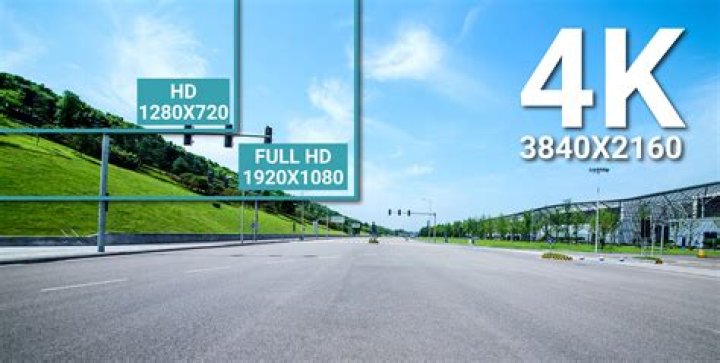
1080p refers to a display resolution of 1920x1080 pixels, where "p" stands for progressive scan. This means that each line of the image is refreshed sequentially, resulting in a smoother and more detailed picture compared to interlaced displays. The term "1080p" is widely used in the tech industry to describe high-definition visuals that offer sharpness and clarity.
Progressive scanning eliminates the flicker effect often associated with interlaced displays, making it ideal for fast-moving content such as video games and action movies. This resolution has become the standard for many devices, including televisions, computer monitors, and smartphones.
Key Features of 1080p
- Resolution of 1920x1080 pixels
- Progressive scan for smoother visuals
- Ideal for HD content
A Brief History of 1080p
The development of 1080p can be traced back to the early 2000s when high-definition television (HDTV) began gaining popularity. Initially, 720p was the standard for HD content, but advancements in technology led to the introduction of 1080p, offering even higher resolution and better image quality.
By the mid-2000s, 1080p had become the benchmark for HD displays, with manufacturers incorporating this resolution into their products. Today, it remains a popular choice for consumers seeking a balance between affordability and visual quality.
Major Milestones in 1080p Development
- 2003: First 1080p HDTVs introduced to the market
- 2006: Blu-ray discs adopt 1080p as a standard format
- 2010: Widespread adoption of 1080p in consumer electronics
Understanding Resolution in 1080p
Resolution refers to the number of pixels displayed on a screen, measured in width and height. In the case of 1080p, the resolution is 1920x1080 pixels, meaning there are 1,920 pixels horizontally and 1,080 pixels vertically. This results in a total of 2,073,600 pixels, providing a sharp and detailed image.
The aspect ratio of 1080p is 16:9, which is the standard widescreen format used in modern displays. This ratio ensures that content is displayed proportionally, without distortion or cropping.
Pixel Density and Its Importance
Pixel density, measured in pixels per inch (PPI), determines how sharp an image appears on a screen. Higher pixel density results in clearer visuals, making 1080p an excellent choice for medium-sized displays.
Advantages of 1080p
1080p offers numerous benefits that make it a popular choice for both consumers and professionals. Some of the key advantages include:
- Sharp and detailed visuals
- Compatibility with a wide range of devices
- Affordable pricing compared to higher resolutions
- Wide availability of 1080p content
These benefits make 1080p an ideal resolution for everyday use, providing a balance between quality and cost-effectiveness.
1080p vs. Other Resolutions
While 1080p remains a popular choice, it's essential to understand how it compares to other resolutions. Let's take a look at some of the most common alternatives:
1080p vs. 720p
720p, also known as HD Ready, has a resolution of 1280x720 pixels. While it offers decent image quality, 1080p provides significantly better detail and clarity, making it the preferred choice for HD content.
1080p vs. 4K
4K resolution, which stands at 3840x2160 pixels, offers four times the pixel count of 1080p, resulting in unparalleled sharpness and detail. However, 4K displays are generally more expensive and require more powerful hardware to run smoothly.
Common Uses of 1080p
1080p is widely used across various applications, including:
- Television broadcasting
- Video gaming
- Streaming services
- Computer monitors
Its versatility and affordability make it a go-to resolution for many users who prioritize quality without breaking the bank.
Limitations of 1080p
Despite its many advantages, 1080p does have some limitations. These include:
- Lower pixel density on larger screens
- Less detail compared to higher resolutions like 4K
- Compatibility issues with older devices
While these limitations may not affect all users, they are worth considering when choosing a display resolution.
The Future of 1080p
As technology continues to advance, higher resolutions like 4K and 8K are becoming more prevalent. However, 1080p is likely to remain relevant for years to come, especially for smaller displays and budget-conscious consumers.
Manufacturers are also focusing on improving other aspects of display technology, such as refresh rates and color accuracy, which can enhance the overall viewing experience even at lower resolutions.
Tips for Choosing a 1080p Display
If you're in the market for a 1080p display, consider the following tips:
- Choose a screen size that suits your needs
- Look for displays with high refresh rates for smoother visuals
- Check for compatibility with your devices
- Read reviews and compare prices to find the best value
By keeping these factors in mind, you can make an informed decision when purchasing a 1080p display.
Conclusion
In conclusion, 1080p remains a popular and reliable resolution for a wide range of applications. Its balance of quality and affordability makes it an excellent choice for both casual users and professionals. By understanding what 1080p entails and how it compares to other resolutions, you can make a more informed decision when selecting a display device.
We encourage you to share your thoughts and experiences with 1080p in the comments below. Additionally, feel free to explore other articles on our site for more insights into display technology and related topics. Thank you for reading!
Data Sources:



