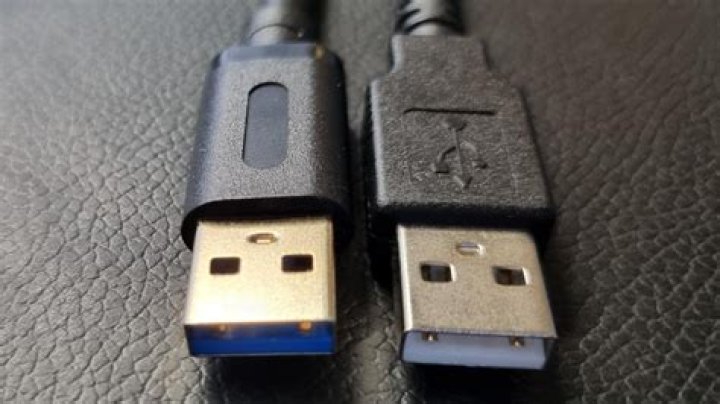
USB technology has revolutionized the way we transfer data and connect devices to our computers. Understanding USB2 and USB3 compatibility is crucial for anyone looking to maximize the performance and functionality of their devices. Whether you're upgrading your hardware or troubleshooting connectivity issues, this guide will provide you with everything you need to know about USB2 and USB3 compatibility.
With the rapid advancement of technology, it's important to stay informed about the differences between USB2 and USB3 standards. This article delves into the technical aspects, advantages, limitations, and compatibility issues between these two versions. By the end of this guide, you'll have a clear understanding of how they work together and what to consider when choosing devices or cables.
This comprehensive guide is designed to address all your questions about USB2 and USB3 compatibility. From backward compatibility to performance optimization, we'll cover it all. Let's dive in and explore the world of USB connectivity.
Introduction to USB Standards
Universal Serial Bus (USB) is a standard interface used to connect various devices to computers and other electronic devices. Over the years, USB has evolved significantly, with USB2 and USB3 being two of the most prominent versions. Understanding the basics of USB standards is essential for anyone who wants to ensure seamless connectivity and optimal performance.
USB2, introduced in 2000, offered a significant improvement over its predecessor, USB1.1, with faster data transfer rates. However, the demand for even faster speeds led to the development of USB3, which was released in 2008. This newer version provides much higher data transfer rates, making it ideal for modern applications such as high-definition video and large file transfers.
While both USB2 and USB3 are widely used today, their compatibility remains a key concern for users. This section will explore the fundamental differences between these two standards and how they interact with each other.
Overview of USB2 and USB3
USB2 Specifications
USB2, also known as Hi-Speed USB, offers a maximum theoretical data transfer rate of 480 Mbps. This version is still widely used in older devices and remains compatible with many modern systems. However, its speed limitations can become a bottleneck for users who require faster data transfers.
- Data transfer rate: 480 Mbps
- Power delivery: Up to 500mA
- Common applications: Keyboards, mice, external hard drives, and USB flash drives
USB3 Specifications
USB3, often referred to as SuperSpeed USB, boasts a maximum theoretical data transfer rate of 5 Gbps, which is ten times faster than USB2. This version also supports higher power delivery, making it suitable for powering energy-intensive devices.
- Data transfer rate: 5 Gbps
- Power delivery: Up to 900mA
- Common applications: High-definition video, large file transfers, and external storage devices
Understanding USB2 and USB3 Compatibility
One of the most common questions users have is whether USB2 and USB3 devices are compatible. The good news is that USB3 is backward compatible with USB2, meaning that USB3 devices can be connected to USB2 ports and vice versa. However, there are some important considerations to keep in mind.
When a USB3 device is connected to a USB2 port, the data transfer rate will be limited to the speed of USB2. Similarly, when a USB2 device is connected to a USB3 port, it will operate at USB2 speeds. This compatibility ensures that users can continue using their older devices while still benefiting from the advanced features of USB3.
It's worth noting that full USB3 performance can only be achieved when both the host device and peripheral device support USB3 standards. This section will explore the nuances of USB2 and USB3 compatibility in greater detail.
Speed Differences Between USB2 and USB3
One of the most significant differences between USB2 and USB3 is their data transfer speeds. USB3 offers a theoretical maximum speed of 5 Gbps, while USB2 is limited to 480 Mbps. In practical terms, this means that USB3 can transfer large files much faster than USB2, making it ideal for applications that require high-speed data transfer.
However, actual performance may vary depending on factors such as the quality of the cable, the capabilities of the host device, and the type of peripheral being used. For example, a high-quality USB3 cable connected to a modern motherboard will generally provide better performance than a lower-quality cable connected to an older system.
Understanding the speed differences between USB2 and USB3 is essential for making informed decisions about which devices to purchase and how to optimize their performance.
Hardware Requirements for USB3
To fully utilize the capabilities of USB3, you'll need to ensure that both your host device and peripheral devices support this standard. This includes having a motherboard with USB3 ports, a USB3 controller, and compatible cables. Additionally, some older systems may require the installation of specific drivers to enable USB3 functionality.
When purchasing USB3 devices, it's important to check their specifications to ensure compatibility with your system. For example, some external hard drives may advertise USB3 support but may not fully utilize the speed potential due to internal limitations.
This section will provide a detailed breakdown of the hardware requirements for USB3 and offer tips for optimizing performance.
Benefits of Using USB3 Over USB2
While USB2 remains a reliable standard for many applications, USB3 offers several advantages that make it the preferred choice for modern users. These benefits include:
- Faster data transfer rates: USB3 can transfer data up to ten times faster than USB2, making it ideal for large file transfers and high-definition video.
- Improved power delivery: USB3 supports higher power output, allowing it to charge devices more quickly and power more energy-intensive peripherals.
- Enhanced functionality: USB3 introduces new features such as bidirectional data transfer, which allows for simultaneous reading and writing.
These advantages make USB3 a more versatile and future-proof option for users who require high-performance connectivity.
Limitations of USB2 and USB3
While USB2 and USB3 are both highly capable standards, they do have certain limitations that users should be aware of. For example, USB2's slower data transfer rates can become a bottleneck for modern applications, while USB3's higher power requirements may not be supported by all devices.
Additionally, the cost of USB3 devices and cables can be higher than their USB2 counterparts, which may be a consideration for budget-conscious users. This section will explore the limitations of both standards and offer guidance on how to mitigate their effects.
Troubleshooting Common USB Compatibility Issues
Despite the widespread compatibility between USB2 and USB3, users may occasionally encounter issues when connecting devices. These problems can range from slow data transfer speeds to complete failure to recognize the device. Some common troubleshooting steps include:
- Checking the quality of the cable and ensuring it is fully inserted into both the host and peripheral devices.
- Verifying that the host device and peripheral both support the desired USB standard.
- Updating drivers and firmware to ensure optimal performance.
This section will provide a comprehensive guide to troubleshooting USB compatibility issues and offer solutions for common problems.
The Future of USB Technology
As technology continues to evolve, USB standards are likely to undergo further advancements. USB4, which builds on the foundation of USB3, promises even faster data transfer rates and improved functionality. Additionally, the rise of USB-C connectors offers a more versatile and future-proof solution for connecting devices.
Staying informed about the latest developments in USB technology is essential for users who want to ensure their systems remain compatible with the latest devices and applications. This section will explore the future of USB technology and offer insights into what users can expect in the coming years.
Conclusion and Final Thoughts
In conclusion, understanding USB2 and USB3 compatibility is crucial for anyone looking to optimize their device performance and ensure seamless connectivity. While USB3 offers significant advantages over USB2, including faster data transfer rates and improved power delivery, both standards remain widely used and compatible with each other.
We encourage readers to leave comments or questions below and share this article with others who may find it useful. For more information on USB technology and related topics, explore our other articles and resources. Stay informed and stay connected!
Sources:
- USB Implementers Forum (usb.org)
- IEEE Standards Association
- PCMag: USB 3.0 vs. USB 2.0: What's the Difference?



