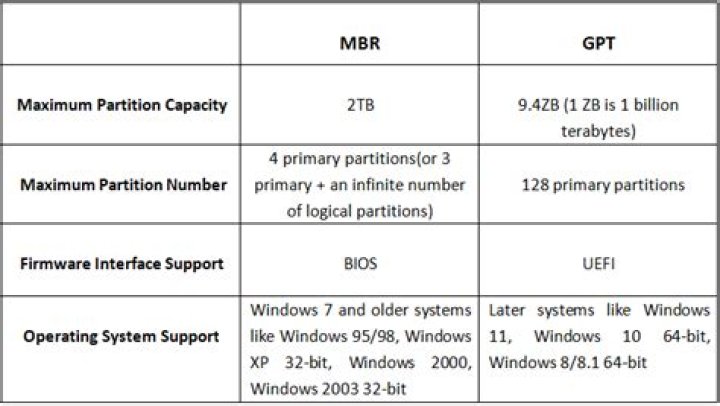
When it comes to partitioning schemes for hard drives, two major systems dominate the field: GPT (GUID Partition Table) and MBR (Master Boot Record). Both have their own advantages and limitations, and understanding the difference between GPT and MBR is crucial for anyone managing storage devices. Whether you're a tech enthusiast or a professional system administrator, this guide will provide you with all the information you need to make an informed decision about which partitioning scheme is best for your needs.
As technology continues to evolve, the way we store and manage data has also changed dramatically. In the past, MBR was the standard for disk partitioning. However, with the rise of larger hard drives and more advanced operating systems, GPT has emerged as a more modern and flexible alternative. Understanding the difference between these two systems is essential for optimizing performance and ensuring compatibility.
This article will delve into the technical aspects of both GPT and MBR, their respective advantages and disadvantages, and how to choose the right one for your specific use case. We will also explore the implications of using one over the other in various scenarios, including booting, data recovery, and future-proofing your storage solutions.
Introduction to GPT and MBR
Before diving into the differences, it's essential to understand what GPT and MBR actually are. Both are methods used to organize and manage data on a storage device. MBR, the older of the two, has been around since the early days of personal computing. GPT, on the other hand, was introduced more recently as part of the UEFI (Unified Extensible Firmware Interface) standard.
In this section, we'll explore the basic functions of both systems and why they matter in modern computing environments.
What is MBR?
MBR, or Master Boot Record, is a partitioning scheme that has been in use since the 1980s. It consists of a small section of the hard drive that contains information about how the disk is partitioned and where the operating system is located. MBR is simple and widely supported, but it has several limitations that make it less suitable for modern storage needs.
Key Features of MBR
- Limited to four primary partitions per disk.
- Supports disks up to 2TB in size.
- Compatible with a wide range of older operating systems.
Despite its limitations, MBR remains a popular choice for many users due to its simplicity and compatibility with legacy systems.
What is GPT?
GPT, or GUID Partition Table, is a newer and more advanced partitioning scheme that addresses many of the limitations of MBR. It was developed as part of the UEFI standard and offers greater flexibility and scalability for modern storage devices.
Key Features of GPT
- Supports an unlimited number of partitions (practically up to 128).
- Can handle disks larger than 2TB.
- Includes redundancy features to protect against data corruption.
GPT is rapidly becoming the preferred choice for modern systems, especially those that require large storage capacities and advanced data management capabilities.
Key Differences Between GPT and MBR
While both GPT and MBR serve the same basic purpose, there are several key differences between them that affect their performance and usability. Below are some of the most important distinctions:
Disk Size Limitations
One of the most significant differences is the maximum disk size each system can handle. MBR is limited to 2TB, while GPT can support disks of virtually any size. This makes GPT the better choice for modern storage solutions, especially as hard drives continue to grow in capacity.
Partition Limits
MBR allows for a maximum of four primary partitions per disk, while GPT can support up to 128 partitions. This flexibility makes GPT ideal for complex storage configurations and multi-boot setups.
Data Integrity
GPT includes built-in redundancy features, such as backup partition tables, which help protect against data loss in the event of corruption. MBR lacks these features, making it more vulnerable to data loss in certain scenarios.
Advantages of GPT
GPT offers several advantages over MBR, making it the preferred choice for modern storage needs:
1. Larger Disk Support
GPT can handle disks of virtually any size, making it ideal for modern high-capacity drives.
2. Increased Partition Flexibility
With support for up to 128 partitions, GPT provides greater flexibility for organizing and managing data.
3. Enhanced Data Protection
GPT's redundancy features help ensure data integrity and reduce the risk of corruption.
Disadvantages of GPT
Despite its many advantages, GPT does have some drawbacks:
1. Limited Legacy Support
Older operating systems and BIOS-based systems may not fully support GPT, which can limit its usability in certain environments.
2. Complexity
GPT is more complex than MBR, which can make it more difficult to configure and manage for less experienced users.
Advantages of MBR
MBR still has its place in modern computing, especially in legacy systems:
1. Wide Compatibility
MBR is supported by virtually all operating systems and hardware platforms, making it a reliable choice for older systems.
2. Simplicity
MBR is straightforward and easy to configure, even for less experienced users.
Disadvantages of MBR
MBR's limitations make it less suitable for modern storage needs:
1. Limited Disk Size
MBR can only handle disks up to 2TB in size, which is insufficient for many modern applications.
2. Limited Partitioning
With only four primary partitions allowed, MBR can be restrictive for complex storage configurations.
Compatibility Considerations
When deciding between GPT and MBR, it's important to consider the compatibility of your hardware and software:
Operating System Support
Modern operating systems like Windows 10, macOS, and Linux support both GPT and MBR, but older systems may only support MBR. Additionally, GPT requires UEFI firmware for booting, which may not be available on older systems.
Hardware Compatibility
Some older hardware may not support GPT or UEFI, which can limit its usability in certain environments. Always check your hardware specifications before making a decision.
How to Convert Between GPT and MBR
If you need to switch between GPT and MBR, there are tools available to help you do so. However, it's important to back up your data before making any changes, as the conversion process can result in data loss if not done properly.
Using Disk Management in Windows
Windows includes a built-in tool called Disk Management that can be used to convert between GPT and MBR. Simply open the tool, select the disk you want to convert, and choose the appropriate option from the menu.
Third-Party Tools
There are also third-party tools available that can help you convert between GPT and MBR. These tools often offer more advanced features and greater flexibility, but they may require more technical knowledge to use effectively.
Conclusion and Recommendations
In conclusion, both GPT and MBR have their own strengths and weaknesses, and the best choice depends on your specific needs and environment. If you're working with modern storage devices and need support for large disks and advanced features, GPT is the better choice. However, if you're working with older systems or need maximum compatibility, MBR may still be the way to go.
We encourage you to explore the options further and make an informed decision based on your unique requirements. Don't forget to share this article with your friends and colleagues, and feel free to leave a comment below if you have any questions or feedback.
For further reading, check out our other articles on storage solutions and technology trends. Together, we can stay ahead of the curve in the ever-evolving world of computing!
References:




