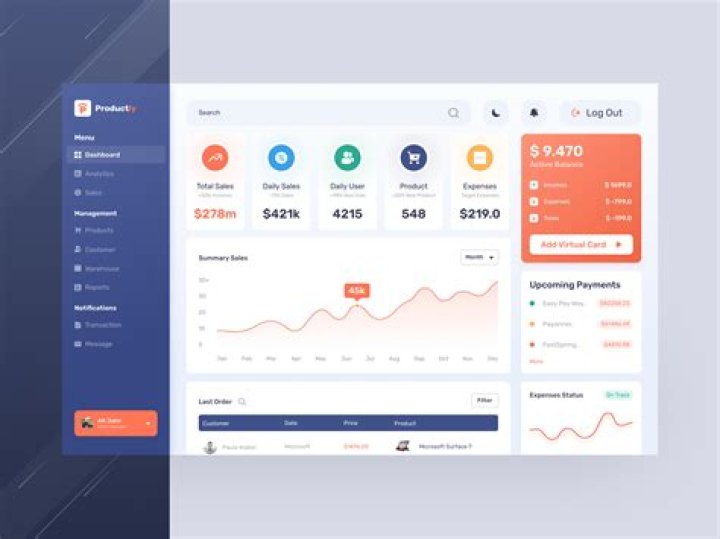
User interface (UI) design plays a pivotal role in shaping how users interact with digital products. As technology evolves, the importance of intuitive and visually appealing interfaces grows exponentially. UI design is not just about aesthetics; it's about creating seamless experiences that enhance usability and user satisfaction.
In today's digital landscape, businesses are recognizing the value of investing in high-quality UI design. A well-designed interface can significantly improve user engagement, reduce bounce rates, and increase conversion rates. Whether you're a designer, developer, or business owner, understanding UI principles is crucial to success in the digital world.
This comprehensive guide will explore the fundamentals of UI design, provide practical tips, and highlight the latest trends. By the end of this article, you'll have a solid understanding of how to create effective user interfaces that meet modern standards and user expectations.
Introduction to UI Design
User interface (UI) design focuses on enhancing the visual and interactive elements of digital products. It involves creating layouts, selecting color schemes, typography, and designing buttons, icons, and other interactive components. The goal is to ensure that users can easily navigate and interact with the product.
UI design has evolved significantly over the years. From simple command-line interfaces to today's sophisticated graphical interfaces, the field continues to grow. Modern UI design incorporates advanced technologies like artificial intelligence, augmented reality, and voice recognition to create more immersive experiences.
In this section, we'll delve deeper into the basics of UI design, its history, and its importance in today's digital ecosystem.
Core Principles of UI Design
Consistency
Consistency is one of the most important principles in UI design. Users expect a uniform experience across all elements of an interface. This includes consistent color schemes, typography, and interaction patterns. Consistency helps users understand how to interact with the product without needing extensive instructions.
Simplicity
Simplicity ensures that users can quickly grasp how to use a product. A clutter-free interface with clear navigation paths and intuitive controls enhances usability. Simplifying the design process involves removing unnecessary elements and focusing on what truly matters to the user.
Feedback
Providing immediate feedback is essential in UI design. Whether it's a button press, form submission, or loading animation, users should receive clear signals that their actions have been acknowledged. Feedback mechanisms improve user confidence and reduce frustration.
Why UI Design Matters
User interface design directly impacts user satisfaction, engagement, and retention. A poorly designed interface can lead to high bounce rates, negative reviews, and lost revenue. On the other hand, a well-designed interface can enhance brand perception, increase user loyalty, and drive business success.
Research shows that users form opinions about a website or app within seconds of interacting with it. This first impression is heavily influenced by the visual appeal and usability of the interface. Businesses that prioritize UI design often see significant improvements in key performance indicators such as conversion rates and customer satisfaction scores.
Key Elements of UI Design
Typography
Typography plays a crucial role in UI design. The choice of fonts, sizes, and spacing affects readability and overall aesthetic appeal. Designers must select fonts that align with the brand identity while ensuring text is legible across various devices and screen sizes.
Color
Color psychology is an important aspect of UI design. Different colors evoke different emotions and reactions. For example, blue is often associated with trust and professionalism, while red can signify urgency or excitement. Designers must carefully choose color palettes that align with the brand and user expectations.
Layout
A well-structured layout ensures that users can easily find what they're looking for. Grid systems, white space, and alignment principles help create balanced and visually appealing designs. Proper layout design also enhances accessibility, making it easier for users with disabilities to navigate the interface.
The Relationship Between UI and UX
While UI design focuses on the visual and interactive elements of a product, user experience (UX) design addresses the overall experience a user has with the product. UI and UX are closely related and often work together to create cohesive digital experiences.
UI designers collaborate with UX designers to ensure that the interface supports the user journey and meets business goals. For example, a UX designer might map out the user flow, while a UI designer translates that flow into a visually appealing and functional interface.
Top Tools for UI Designers
UI designers rely on specialized tools to create stunning interfaces. Some of the most popular tools include:
- Adobe XD: A versatile tool for designing and prototyping interfaces.
- Figma: A cloud-based design tool that allows for real-time collaboration.
- Sketch: A popular choice for macOS users, known for its intuitive interface and plugin ecosystem.
- Zeplin: A tool for streamlining the handoff process between designers and developers.
- InVision: A platform for creating interactive prototypes and gathering user feedback.
Emerging UI Design Trends
Dark Mode
Dark mode has become increasingly popular due to its aesthetic appeal and potential eye strain reduction. Many apps and websites now offer dark mode as an option, allowing users to customize their experience.
Micro-Interactions
Micro-interactions are small animations or effects that enhance the user experience. Examples include button hover effects, loading animations, and feedback notifications. These subtle interactions add personality and depth to the interface.
Voice UI
Voice user interfaces (VUIs) are gaining traction as voice recognition technology improves. Products like Amazon Alexa and Google Assistant demonstrate the potential of voice-controlled interfaces in everyday life.
Best Practices for UI Design
To create effective user interfaces, designers should follow these best practices:
- Conduct thorough user research to understand target audience needs.
- Test designs with real users to gather feedback and make improvements.
- Adhere to accessibility guidelines to ensure inclusivity.
- Stay updated on the latest design trends and technologies.
- Collaborate closely with UX designers and developers to ensure alignment.
Real-World UI Design Case Studies
Case studies provide valuable insights into how UI design principles are applied in real-world scenarios. For example, companies like Airbnb and Uber have revolutionized their industries through innovative UI design. By studying successful case studies, designers can learn from best practices and avoid common pitfalls.
The Future of UI Design
The future of UI design is exciting and full of possibilities. Advancements in technology, such as virtual reality, augmented reality, and artificial intelligence, will continue to shape the field. As interfaces become more immersive and interactive, designers must adapt to meet evolving user expectations.
Additionally, the rise of cross-platform design and responsive interfaces will require designers to think beyond traditional screens. Creating seamless experiences across devices and platforms will be a key challenge and opportunity in the years to come.
Conclusion
In conclusion, user interface design is a vital component of digital product development. By following core principles, leveraging the right tools, and staying informed about emerging trends, designers can create interfaces that delight users and drive business success.
We invite you to share your thoughts and experiences in the comments below. Have you encountered any challenges in UI design? What tools or techniques have worked best for you? Don't forget to explore our other articles for more insights into the world of design and technology.
Data Sources: Nielsen Norman Group, W3C Accessibility Guidelines, Adobe XD Documentation




