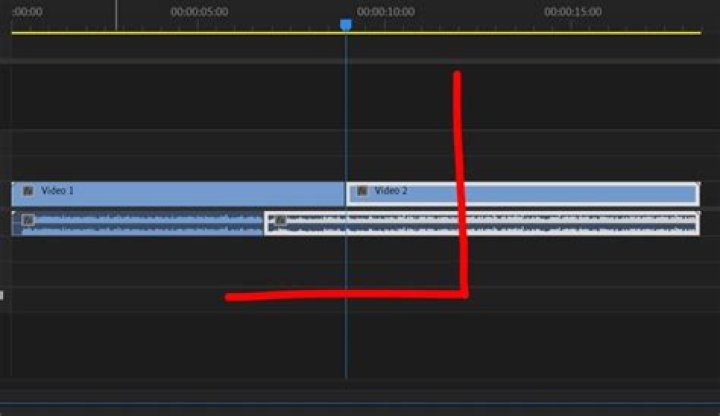
Editing techniques play a crucial role in shaping the narrative flow of films, and one of the most impactful tools in an editor's arsenal is the J cut. This technique has become an essential element in modern filmmaking, allowing filmmakers to create seamless transitions and enhance storytelling. Understanding how and when to use a J cut can elevate your film's narrative and captivate your audience.
When it comes to audio-visual storytelling, timing and rhythm are everything. The J cut, as a post-production editing technique, allows filmmakers to manipulate time and space in creative ways. By placing the audio from the next scene before the visual cut, editors can build anticipation, evoke emotion, or provide context, making the story more engaging for viewers.
This article will delve deep into the world of J cuts in film, exploring its definition, practical applications, advantages, and how to master it effectively. Whether you're a beginner editor or a seasoned filmmaker, understanding the nuances of the J cut can significantly enhance your craft.
What is a J Cut?
A J cut is an editing technique where the audio from the next scene is heard before the visual transition occurs. This creates a seamless overlap that enhances the storytelling process by allowing the audience to hear what's coming next before they see it. The name "J cut" comes from the shape the audio track takes when viewed on a timeline in video editing software—it resembles the letter "J."
This technique is widely used in various genres, from documentaries to feature films, because it provides a natural flow between scenes. By preparing the audience for the next scene through audio cues, filmmakers can maintain continuity and build suspense, making the viewing experience more immersive.
Why is J Cut Important in Film Editing?
The importance of the J cut lies in its ability to create emotional connections and provide context. For instance, hearing a character's voice or ambient sounds before seeing the corresponding visuals can evoke curiosity or tension, depending on the narrative intent.
- Builds anticipation
- Enhances emotional impact
- Creates smooth transitions
- Provides context for upcoming scenes
History of J Cut in Film
The origins of the J cut date back to the early days of sound cinema when editors began experimenting with audio-visual synchronization. As films evolved from silent movies to talkies, the need for innovative editing techniques arose to improve storytelling. Over time, the J cut became a staple in film editing, used by legendary directors and editors alike.
One of the earliest examples of the J cut can be traced to films like "Citizen Kane" (1941), where director Orson Welles and editor Robert Wise employed this technique to create seamless transitions between scenes. Since then, the J cut has been refined and adapted to suit different storytelling styles, making it a versatile tool in the editor's toolkit.
J Cut vs L Cut: Understanding the Differences
While both J cuts and L cuts involve overlapping audio and visuals, they serve different purposes in film editing. An L cut, also known as a split edit, occurs when the audio from the current scene continues into the next scene while the visuals change. Conversely, a J cut introduces the audio from the next scene before the visuals transition.
Key Differences Between J Cut and L Cut
- J Cut: Audio from the next scene plays before the visual transition.
- L Cut: Audio from the current scene continues into the next scene.
Choosing between a J cut and an L cut depends on the narrative needs of the film. For instance, a J cut is ideal for building anticipation, while an L cut works well for maintaining continuity or extending a moment's impact.
Benefits of Using J Cut
The J cut offers numerous advantages for filmmakers looking to enhance their storytelling. Below are some of the key benefits:
- Seamless Transitions: The J cut creates smooth transitions between scenes, avoiding abrupt cuts that might disrupt the flow of the narrative.
- Emotional Engagement: By introducing audio from the next scene, filmmakers can evoke emotions and prepare the audience for what's coming.
- Contextual Clues: The J cut provides viewers with hints about the upcoming scene, helping them understand the story better.
- Enhanced Rhythm: This technique allows editors to control the pacing of the film, creating a rhythm that aligns with the story's tone.
How to Use J Cut Effectively
To master the art of the J cut, editors must understand its applications and limitations. Below are some practical tips for using the J cut effectively:
Step-by-Step Guide to Implementing a J Cut
- Identify the scenes where a J cut would enhance the narrative.
- Trim the audio track of the next scene so that it overlaps with the current scene's visuals.
- Adjust the timing to ensure the transition feels natural and enhances the story.
- Test the edit to confirm that the J cut achieves the desired effect.
It's essential to strike a balance when using the J cut. Overusing this technique can make the film feel repetitive or predictable, while underusing it might miss opportunities to elevate the storytelling.
Examples of J Cut in Famous Films
Many renowned films have successfully utilized the J cut to enhance their storytelling. Below are some notable examples:
- "The Godfather" (1972): Director Francis Ford Coppola and editor William Reynolds used J cuts to create tension and suspense during key moments in the film.
- "Pulp Fiction" (1994): Quentin Tarantino employed J cuts to maintain continuity and build anticipation between scenes.
- "Mad Max: Fury Road" (2015): Editor Margaret Sixel used J cuts to create a high-octane rhythm that matched the film's action-packed narrative.
These examples demonstrate the versatility and effectiveness of the J cut in enhancing various genres and styles of filmmaking.
Software for Implementing J Cut
Modern editing software makes it easy to implement J cuts with precision. Below are some popular options:
- Adobe Premiere Pro: Offers robust tools for audio and video editing, making it ideal for creating J cuts.
- Final Cut Pro: Known for its intuitive interface, this software allows editors to implement J cuts seamlessly.
- Avid Media Composer: Widely used in professional settings, Avid provides advanced features for implementing J cuts.
Each software has its strengths, so editors should choose the one that best suits their workflow and preferences.
Common Mistakes to Avoid
While the J cut is a powerful tool, misuse can detract from the film's quality. Below are some common mistakes to avoid:
- Overusing J Cuts: Too many J cuts can make the film feel monotonous and predictable.
- Poor Timing: Misjudging the timing of the J cut can disrupt the narrative flow and confuse the audience.
- Inconsistent Audio Levels: Ensuring audio levels are consistent across scenes is crucial for maintaining immersion.
Editors should approach J cuts with care, ensuring each one serves a specific purpose in the narrative.
Tips for Editors Using J Cut
To maximize the effectiveness of J cuts, editors can follow these tips:
- Plan the use of J cuts during the pre-production phase to ensure they align with the narrative goals.
- Collaborate with directors and sound designers to create cohesive audio-visual transitions.
- Experiment with different timings and lengths for J cuts to find the optimal balance for each scene.
By incorporating these practices, editors can harness the full potential of the J cut to enhance their films.
Conclusion: Elevate Your Storytelling with J Cut
In conclusion, the J cut is a versatile and powerful editing technique that can significantly enhance film storytelling. By understanding its definition, history, benefits, and practical applications, filmmakers can use the J cut to create seamless transitions, evoke emotions, and provide context for their audience.
We encourage readers to experiment with J cuts in their own projects and share their experiences in the comments below. Additionally, feel free to explore other articles on our site for more insights into filmmaking and editing techniques. Together, let's elevate the art of storytelling through innovative editing practices.



