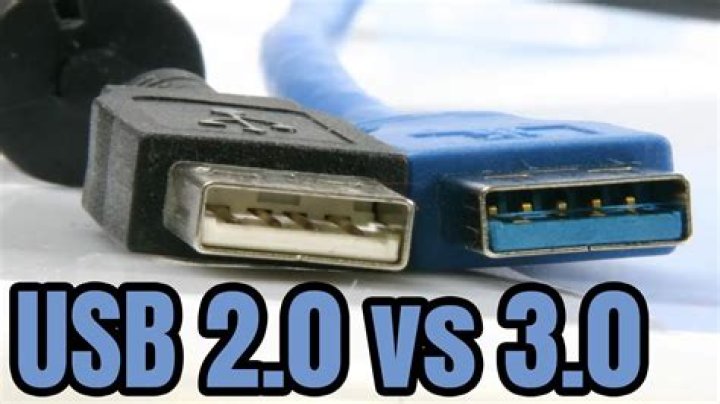
USB technology has revolutionized the way we connect devices to our computers and transfer data. As newer versions of USB emerge, such as USB 3.0, many users wonder about its compatibility with older versions like USB 2.0. In this article, we will explore whether USB 3.0 is compatible with USB 2.0 and delve into the details of how these standards work together.
With the rapid advancements in technology, it's essential to understand the differences and similarities between USB 3.0 and USB 2.0. Compatibility between these versions ensures that users can seamlessly integrate their devices without worrying about obsolescence. This guide will provide you with all the information you need to make informed decisions about your USB devices.
Whether you're a tech enthusiast, a small business owner, or an everyday user, understanding the compatibility of USB 3.0 with USB 2.0 can help you optimize your workflow and ensure smooth device connectivity. Let’s dive into the details and explore this topic thoroughly.
What is USB 3.0?
USB 3.0, also known as SuperSpeed USB, was introduced in 2008 as an upgrade to the USB 2.0 standard. It offers significantly faster data transfer rates, improved power efficiency, and enhanced features for connecting peripheral devices. USB 3.0 is designed to meet the demands of modern computing, where large files and high-speed data transfers are becoming increasingly common.
One of the standout features of USB 3.0 is its ability to transfer data at speeds up to 5 Gbps, which is ten times faster than USB 2.0's 480 Mbps. Additionally, USB 3.0 provides better power management, allowing devices to charge faster and consume less power when idle.
Advantages of USB 3.0
- Faster data transfer rates
- Improved power efficiency
- Enhanced connectivity options
- Backward compatibility with USB 2.0
What is USB 2.0?
USB 2.0, or High-Speed USB, was released in 2000 and quickly became the industry standard for connecting peripheral devices to computers. It offers data transfer rates of up to 480 Mbps, which was a significant improvement over its predecessor, USB 1.1. USB 2.0 is widely used in devices such as external hard drives, flash drives, printers, and cameras.
Despite the emergence of newer standards like USB 3.0, USB 2.0 remains relevant due to its widespread adoption and compatibility with a wide range of devices. Many older devices still rely on USB 2.0, making it an essential standard for backward compatibility.
Key Features of USB 2.0
- High-speed data transfer at 480 Mbps
- Wide compatibility with various devices
- Reliable and stable performance
Is USB 3.0 Compatible with USB 2.0?
Yes, USB 3.0 is fully backward compatible with USB 2.0. This means that USB 3.0 devices can be connected to USB 2.0 ports, and vice versa, without any issues. However, when a USB 3.0 device is connected to a USB 2.0 port, it will operate at USB 2.0 speeds, which are significantly slower than USB 3.0 speeds.
Similarly, USB 2.0 devices can be connected to USB 3.0 ports, and they will function normally, albeit at USB 2.0 speeds. This backward compatibility ensures that users can continue using their existing USB 2.0 devices while taking advantage of the enhanced features of USB 3.0 when needed.
Why Backward Compatibility Matters
Backward compatibility is crucial for maintaining the usability of older devices and preventing obsolescence. It allows users to gradually upgrade their devices without having to replace everything at once. This flexibility is particularly important for businesses and individuals who rely on a mix of older and newer technology.
Key Differences Between USB 3.0 and USB 2.0
While USB 3.0 and USB 2.0 are compatible, there are several key differences between the two standards that affect performance and functionality. Understanding these differences can help you make informed decisions about which standard to use for your specific needs.
Data Transfer Speed
USB 3.0 offers data transfer speeds of up to 5 Gbps, while USB 2.0 is limited to 480 Mbps. This difference in speed is particularly noticeable when transferring large files or using high-bandwidth devices.
Power Management
USB 3.0 provides better power management, allowing devices to charge faster and consume less power when idle. USB 2.0, on the other hand, has limited power delivery capabilities and may not be suitable for power-hungry devices.
Number of Wires
USB 3.0 uses more wires than USB 2.0, which enables faster data transfer and improved communication between devices. This additional wiring also contributes to the higher performance of USB 3.0.
Performance Comparison
A performance comparison between USB 3.0 and USB 2.0 reveals significant differences in speed, power efficiency, and overall functionality. In real-world scenarios, USB 3.0 devices can transfer data up to ten times faster than USB 2.0 devices, making them ideal for tasks that require high-speed data transfer.
Additionally, USB 3.0's improved power management capabilities make it a better choice for devices that require fast charging or extended battery life. However, for tasks that do not require high-speed data transfer, USB 2.0 remains a reliable and cost-effective option.
Backward Compatibility Explained
Backward compatibility refers to the ability of newer technology to work with older technology. In the case of USB 3.0 and USB 2.0, backward compatibility ensures that USB 3.0 devices can be connected to USB 2.0 ports and vice versa. This compatibility is achieved through the design of USB connectors and the way data is transmitted between devices.
When a USB 3.0 device is connected to a USB 2.0 port, it will automatically switch to USB 2.0 mode, ensuring seamless operation. Similarly, USB 2.0 devices connected to USB 3.0 ports will function normally, albeit at USB 2.0 speeds.
How Backward Compatibility Works
USB 3.0 and USB 2.0 share common connectors, which allows them to be physically compatible. The data transfer protocols are also designed to work together, ensuring that devices can communicate effectively regardless of the USB version being used.
Forward Compatibility
Forward compatibility refers to the ability of older technology to work with newer technology. While USB 2.0 devices can connect to USB 3.0 ports, they do not take full advantage of the enhanced features of USB 3.0. This limitation means that forward compatibility is not as comprehensive as backward compatibility.
However, forward compatibility is still important for ensuring that older devices can continue to function in environments that use newer technology. This flexibility allows users to gradually upgrade their devices without losing functionality.
Practical Uses of USB 3.0 and USB 2.0
USB 3.0 and USB 2.0 have different practical uses depending on the specific needs of the user. USB 3.0 is ideal for tasks that require high-speed data transfer, such as transferring large files, backing up data, or using high-bandwidth devices like external hard drives and cameras. USB 2.0, on the other hand, is suitable for tasks that do not require high-speed data transfer, such as connecting printers, keyboards, and mice.
For businesses and individuals who need to balance cost and performance, USB 2.0 remains a viable option for many applications. However, as technology continues to evolve, USB 3.0 is becoming increasingly important for meeting the demands of modern computing.
The Future of USB Technology
The future of USB technology looks promising, with ongoing developments aimed at improving speed, power efficiency, and functionality. USB 3.1 and USB 3.2 have already been introduced, offering even faster data transfer rates and enhanced features. Additionally, the emergence of USB-C connectors is changing the way we connect devices, providing a more versatile and future-proof solution.
As technology continues to advance, USB standards will likely evolve to meet the demands of new devices and applications. Staying informed about these developments can help users make the most of their USB devices and ensure they remain compatible with the latest technology.
Conclusion
In conclusion, USB 3.0 is fully compatible with USB 2.0, providing seamless integration between older and newer devices. While USB 3.0 offers significant advantages in terms of speed and power efficiency, USB 2.0 remains a reliable and cost-effective option for many applications. Understanding the differences and compatibility between these standards can help you make informed decisions about your USB devices.
We encourage you to leave a comment or share this article with others who may find it useful. For more information on USB technology and related topics, explore our other articles and resources. Stay informed and stay ahead in the ever-evolving world of technology!



