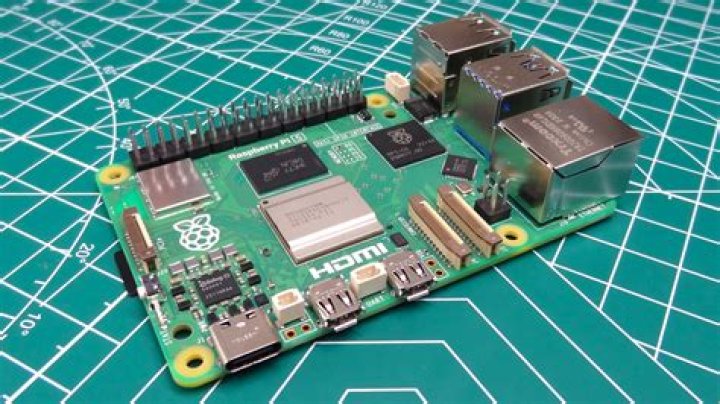
Setting up a Raspberry Pi can seem daunting at first, but with the right guidance, it becomes an exciting and rewarding experience. Whether you're a tech enthusiast, hobbyist, or a beginner in the world of single-board computers, this guide will walk you through every step of the process. From unboxing your Raspberry Pi to configuring it for your projects, we've got you covered.
Raspberry Pi has revolutionized the way people interact with technology, offering a powerful yet affordable platform for countless applications. Its versatility makes it an excellent choice for educational purposes, home automation, media centers, and even advanced projects like artificial intelligence. Understanding how to set up Raspberry Pi is the first step toward unlocking its potential.
In this article, we'll explore everything you need to know about setting up your Raspberry Pi, including hardware requirements, software installation, and troubleshooting tips. By the end of this guide, you'll have the confidence to dive into the world of Raspberry Pi and start building your own projects. Let's get started!
Introduction to Raspberry Pi
Raspberry Pi is a series of small, single-board computers developed by the Raspberry Pi Foundation. Initially designed as an educational tool, it has since evolved into a versatile platform used by hobbyists, professionals, and educators worldwide. The compact device offers impressive performance at an affordable price point, making it accessible to a wide audience.
Key Features of Raspberry Pi
Raspberry Pi comes with a range of features that make it suitable for various applications. Some of the standout features include:
- Compact design with multiple GPIO pins for hardware interfacing.
- Support for multiple operating systems, including Raspberry Pi OS, Ubuntu, and others.
- High-performance processors capable of running complex applications.
- Built-in connectivity options such as Wi-Fi, Bluetooth, and Ethernet.
Hardware Requirements for Raspberry Pi
Before setting up your Raspberry Pi, you'll need to gather a few essential components. These hardware requirements ensure that your device operates smoothly and efficiently.
Essential Components
- Raspberry Pi Board: Choose the latest model for the best performance.
- MicroSD Card: A high-quality card with at least 16GB storage is recommended.
- Power Supply: Use an official Raspberry Pi power adapter for optimal performance.
- Keyboard and Mouse: For initial setup, a wired or wireless keyboard and mouse are necessary.
- HDMI Cable: To connect your Raspberry Pi to a monitor or TV.
Software Setup for Raspberry Pi
Once you have all the hardware components, the next step is to prepare the software. Raspberry Pi OS is the official operating system for Raspberry Pi, and it's available in multiple versions to suit different needs.
Downloading Raspberry Pi OS
To download Raspberry Pi OS, visit the official Raspberry Pi website. Choose the version that best suits your project requirements, whether it's the full desktop version or the lightweight version.
How to Install Raspberry Pi OS
Installing Raspberry Pi OS involves a few straightforward steps. Follow this guide to ensure a smooth installation process.
Steps to Install Raspberry Pi OS
- Download the Raspberry Pi Imager tool from the official website.
- Insert your MicroSD card into your computer.
- Launch the Raspberry Pi Imager and select the Raspberry Pi OS image you downloaded.
- Choose the MicroSD card as the target device and click "Write" to start the installation.
Connecting Raspberry Pi to the Network
Connecting your Raspberry Pi to the network allows you to access the internet and control it remotely. This section explains how to set up both wired and wireless connections.
Wired Network Setup
For a stable connection, use an Ethernet cable to connect your Raspberry Pi to your router. This method ensures consistent network performance without interference.
Wireless Network Setup
To connect via Wi-Fi, follow these steps:
- Open the Raspberry Pi desktop interface.
- Click on the network icon in the top-right corner.
- Select your Wi-Fi network and enter the password when prompted.
Configuring Raspberry Pi Settings
Customizing your Raspberry Pi settings enhances its usability and performance. From adjusting display settings to enabling SSH, this section covers the essential configurations.
Display Settings
Adjust the display settings to ensure optimal visibility. You can change the resolution, refresh rate, and overscan settings to match your monitor's capabilities.
Enabling SSH
Secure Shell (SSH) allows you to access your Raspberry Pi remotely. To enable SSH:
- Open the terminal on your Raspberry Pi.
- Run the command
sudo raspi-config. - Select "Interfacing Options" and enable SSH.
Popular Raspberry Pi Projects
One of the most exciting aspects of Raspberry Pi is its potential for creative projects. Here are some popular ideas to inspire your next build:
Home Automation
Use Raspberry Pi to automate your home, controlling lights, thermostats, and security systems with ease.
Media Center
Transform your Raspberry Pi into a media center using software like Kodi for streaming movies and music.
Troubleshooting Common Issues
Encountering issues during setup is normal, but with the right troubleshooting techniques, you can resolve them quickly.
No Display on Monitor
If your Raspberry Pi doesn't display anything on the monitor, check the following:
- Ensure the MicroSD card is inserted correctly.
- Verify the HDMI cable connection.
- Try using a different monitor or TV.
Ensuring Raspberry Pi Security
Securing your Raspberry Pi is crucial, especially if it's connected to the internet. Follow these best practices to protect your device:
Update Regularly
Keep your Raspberry Pi OS up to date by running the commands sudo apt update and sudo apt upgrade periodically.
Change Default Password
Change the default password immediately after setup to prevent unauthorized access.
The Future of Raspberry Pi
As technology continues to evolve, so does the Raspberry Pi ecosystem. With ongoing developments in hardware, software, and community support, the possibilities for Raspberry Pi projects are endless. Stay tuned for future releases and enhancements that will further expand its capabilities.
Conclusion
Setting up a Raspberry Pi is an excellent way to explore the world of technology and innovation. By following the steps outlined in this guide, you can successfully configure your Raspberry Pi for a variety of applications. Remember to explore the vast array of projects and resources available to make the most of your device.
We encourage you to share your experiences and projects in the comments below. Your feedback helps us improve and inspire others in the Raspberry Pi community. Don't forget to explore our other articles for more tips and tutorials on leveraging Raspberry Pi's full potential.




