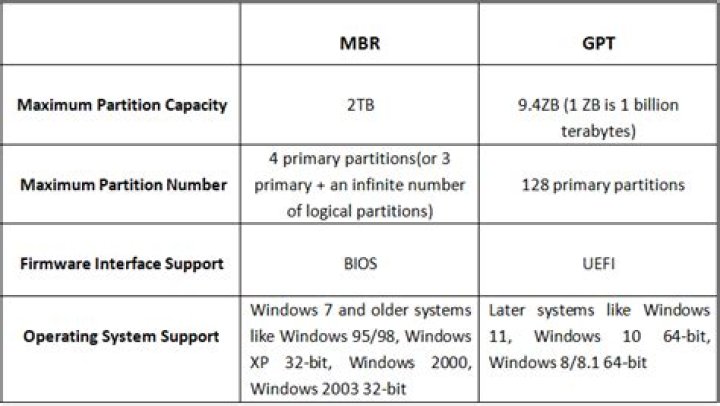
When it comes to configuring a disk partition, the decision between GPT (GUID Partition Table) or MBR (Master Boot Record) is crucial. Both partition styles have their own advantages and limitations, and choosing the right one can significantly impact your system's performance and data storage capabilities. Understanding the differences between these two systems will help you make an informed decision.
With the rapid evolution of technology, modern computing systems require more advanced solutions to handle large volumes of data and complex hardware configurations. GPT and MBR are two partitioning systems that play a critical role in organizing and managing data on your hard drive. Each system has unique features designed to cater to specific needs.
In this comprehensive guide, we will explore the key differences between GPT and MBR, their benefits, limitations, and when to use each one. Whether you're a tech enthusiast or a casual user, this article will provide you with all the information you need to decide which partition style best suits your requirements.
Introduction to GPT and MBR
Before diving into the specifics, let's first understand what GPT and MBR are. These two partition styles are fundamental components of disk management and are responsible for organizing and storing data on a hard drive. While both serve the same purpose, their functionality and capabilities differ significantly.
MBR has been the traditional method for partitioning disks and is widely supported across various operating systems. However, with the increasing demand for larger storage capacities and more reliable data management, GPT emerged as a more advanced alternative. Let's explore each of these systems in detail.
What is GPT?
GPT, or GUID Partition Table, is a modern partitioning system introduced as part of the UEFI (Unified Extensible Firmware Interface) standard. It was designed to overcome the limitations of MBR and offers several advantages, including support for larger disks and more partitions.
GPT uses a globally unique identifier (GUID) to define each partition, making it more robust and less prone to errors. This system also includes a backup of the partition table at the end of the disk, which enhances data recovery capabilities.
What is MBR?
MBR, or Master Boot Record, has been the standard partitioning scheme for decades. It is a simple and efficient system that divides a disk into partitions and stores information about these partitions in the first sector of the disk.
Despite its simplicity, MBR has certain limitations, such as a maximum disk size of 2TB and a limit of four primary partitions. However, it remains widely used due to its compatibility with older systems and operating systems.
Differences Between GPT and MBR
Partition Limits
One of the most significant differences between GPT and MBR is the number of partitions they can support. GPT allows up to 128 partitions per disk, whereas MBR is limited to four primary partitions or three primary partitions and one extended partition.
This limitation can be a major drawback for MBR when dealing with complex disk configurations or large storage arrays. GPT's ability to handle more partitions makes it more versatile and suitable for modern computing environments.
Data Recovery
Data recovery is another area where GPT outperforms MBR. GPT stores multiple copies of the partition table across the disk, providing redundancy and making it easier to recover data in case of corruption or failure. MBR, on the other hand, relies on a single partition table, which can lead to data loss if it becomes corrupted.
When to Use GPT
GPT is ideal for modern systems that require large storage capacities and advanced data management features. If you're working with disks larger than 2TB or need more than four partitions, GPT is the preferred choice. It is also recommended for systems using UEFI firmware, as GPT is fully compatible with UEFI booting.
Additionally, GPT's enhanced data recovery capabilities make it a safer option for critical systems where data integrity is paramount.
When to Use MBR
MBR is still a viable option for older systems and smaller disks. If you're using a system with BIOS firmware or need compatibility with legacy operating systems, MBR may be the better choice. Its simplicity and widespread support make it a reliable option for basic disk management tasks.
However, keep in mind that MBR's limitations in terms of disk size and partition number may become a constraint as technology advances.
Advantages of GPT
GPT offers several advantages over MBR, including:
- Support for disks larger than 2TB.
- Ability to create up to 128 partitions.
- Enhanced data recovery through redundant partition tables.
- Compatibility with UEFI firmware and modern operating systems.
Advantages of MBR
Despite its limitations, MBR has its own set of advantages:
- Widely supported across older systems and legacy operating systems.
- Simplicity and efficiency for basic disk management tasks.
- Compatibility with BIOS firmware.
Converting Between GPT and MBR
Converting GPT to MBR
Converting a GPT disk to MBR is possible, but it requires careful consideration. The conversion process will erase all data on the disk, so it's essential to back up your files before proceeding. Tools like Disk Management in Windows or third-party software can be used to perform the conversion.
Converting MBR to GPT
Similarly, converting an MBR disk to GPT can be done using built-in tools or third-party software. However, the same caution applies: all data on the disk will be erased during the conversion process. It's crucial to ensure that your system supports GPT and UEFI before making the switch.
Compatibility Issues
When choosing between GPT and MBR, it's important to consider compatibility with your hardware and operating system. GPT is fully compatible with UEFI firmware and modern operating systems like Windows 10 and later versions. However, it may not work with older systems that rely on BIOS firmware or legacy operating systems.
MBR, on the other hand, is widely supported across older systems and operating systems, making it a safer option for compatibility. However, its limitations in terms of disk size and partition number may become a constraint in modern computing environments.
Final Thoughts
In conclusion, the decision between GPT and MBR depends on your specific needs and the capabilities of your system. GPT offers advanced features and greater flexibility, making it the preferred choice for modern systems with large storage requirements. MBR, while limited, remains a reliable option for older systems and basic disk management tasks.
We encourage you to carefully evaluate your system's requirements and consult the documentation for your hardware and operating system before making a decision. If you have any questions or would like to share your experiences with GPT or MBR, feel free to leave a comment below. Don't forget to explore our other articles for more insightful content on technology and computing!
References:




